
Verity BE is an official community addon created by Utlover65 that brings the character Verity into Minecraft Bedrock Edition. The project draws heavy inspiration from ThatMob’s viral Minecraft series where Verity appears as an all knowing helper that gradually reveals a darker side.
In the game Verity spawns as a small yellow entity. You can talk to it by typing in chat. It uses real AI to generate responses, so the conversations feel natural rather than limited to a fixed list of replies. It supports many languages and tries to answer in the same language you use. The addon also includes reactive facial expressions that change based on what is happening, custom animations, sound effects, and a few special entities that appear as the story progresses.
The project has grown quickly. Millions of players have downloaded it from CurseForge. It works on supported versions of Minecraft Bedrock, currently including 26.30 and 26.40, and it continues to receive regular updates that add new dialogue, better AI handling, text to speech options, and quality of life improvements.
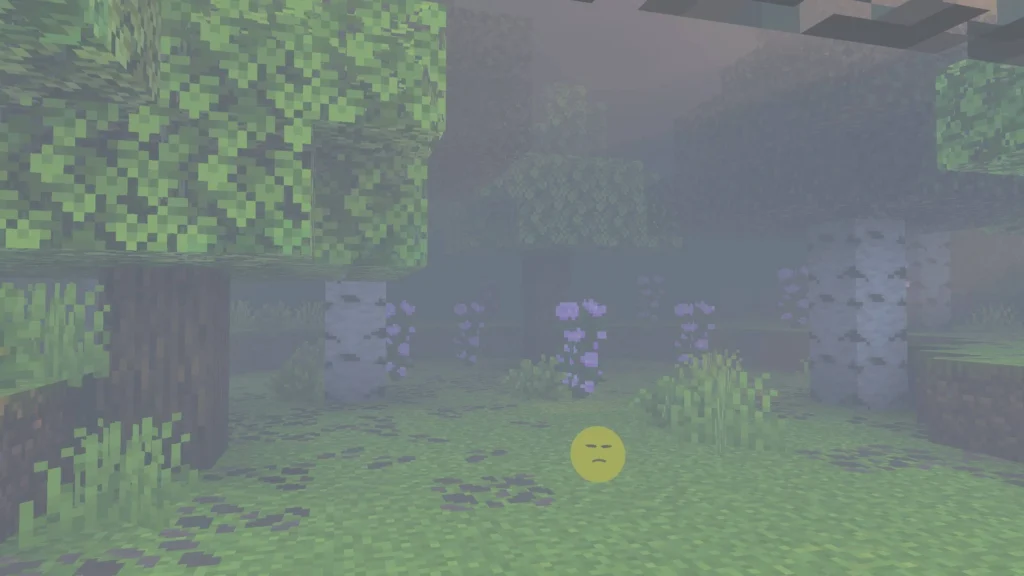
Verity Addon Mcpe: Features
Real AI Driven Conversations
Type “Verity” followed by your message in chat and it responds. You can ask about coordinates, ask it to remember your base location, request music or sounds, get help finding villages or mobs, or just talk about almost anything. The AI has improved across updates with better language detection and more natural replies.
Reactive Faces and Animations
Verity’s face changes based on the situation. It has talking animations, idle behaviors, and reactions when you interact with it. Later updates added the ability to pick Verity up, hold it, and even throw it. It tracks your view while held and reacts when it lands.
Evolving Personality Across Four Phases
This is the heart of the experience. The longer Verity stays in your world, the more its personality shifts through distinct phases. Early on it is helpful and friendly. Over time the tone becomes more revealing, stranger, and eventually more intense. Phase progression was rebalanced in later updates so the changes happen more gradually. Some players notice the shift only after many days of play.
Special Entities and Events
The addon includes the Smiler, a related entity that becomes more aggressive and aware as things progress. There are also Verity eggs that can hatch when dropped, box related animations and particles, and new dialogue options about missing villagers or other lore topics. Some interactions carry warnings. The longer Verity knows you, the more it remembers who has been around and who has been absent.
Helpful Utility Features
Verity can tell you your current coordinates, remember a base location you set, follow you around (with a command to stop it), and locate structures, mobs, water, lava, or other players. Later versions added local text to speech that you can toggle with simple commands. Multilingual support covers many languages including French, German, Portuguese, Spanish and more.
Hearing and Interaction Systems
In some versions Verity responds within a certain range, though carrying an egg or using certain methods can change that. Idle conversation tracking and improved response handling make the interactions feel more alive.
Verity Addon Mcpe: Installation
Proper setup is important because the AI connection and experimental features need to be enabled. Follow these steps carefully.
- Make sure you are on a supported Minecraft Bedrock version (26.30 or 26.40 depending on the file you download).
- Download the latest Verity BE file from the official CurseForge page. Avoid unofficial mirrors when possible.
- Import the .mcaddon file into Minecraft.
- Create a new world or open an existing one and enable experimental features. Specifically turn on Beta APIs under the Experimental Toggles section.
- Enable cheats in the world settings.
- Once inside the world, run the required connect command in chat. The exact command is usually something like /script debugger connect traye.ddns.net or the automatic version shown in the official tutorial. Check the description or Discord for the current command if it has changed.
- Type “Verity” followed by a message to start talking.
A setup tutorial video is linked on the official page and is strongly recommended for first time users. If Verity only replies with “…” or does not appear, the most common causes are missing the connect command, Beta APIs not enabled, or using an outdated version of the addon.
How to Play and Interact With Verity
Open chat and type Verity followed by whatever you want to say. Distance often does not matter. You can ask practical questions or just chat, Some useful interactions that players enjoy include asking for coordinates, setting a base location for Verity to remember, requesting it to follow or stop following, asking it to play music or sounds, and exploring the deeper dialogue options as the phases progress.
Who Should Try Verity BE?
This addon is perfect for players who enjoy AI companions, story driven experiences, and a mix of helpful tools with light horror atmosphere. It works well for solo players who want company while exploring and for groups who want a shared evolving character in their world. If you liked the original ThatMob series or simply want something more interactive than standard Minecraft, Verity is worth trying.
It is less ideal if you prefer completely vanilla gameplay with no experimental features or if you dislike any form of unsettling content.
Important Links
| Link Description | URL |
|---|---|
| Official CurseForge Page | https://www.curseforge.com/minecraft-bedrock/addons/verity-be |
| Setup Tutorial Video | https://www.youtube.com/watch?v=Hg-t03cNvKY |
| Creator Support (Ko-fi) | https://ko-fi.com/utlover65 |
